




















































10.04.2025
17:26
To flexibly control access to your resource, use the ability to add IP networks to the allow and block list when configuring filtering rules.
Requests from allow list won't be inspected and blocked, while traffic from block list will be completely blocked by the filtering server.
- Log in to the client area, navigate to "Product/Services" in the left menu, click "Site Protection".
- Select site protection service, click "Block/Allow list" on toolbar.
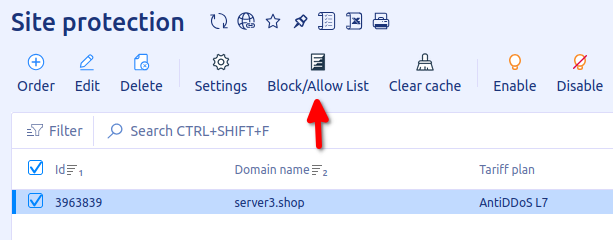
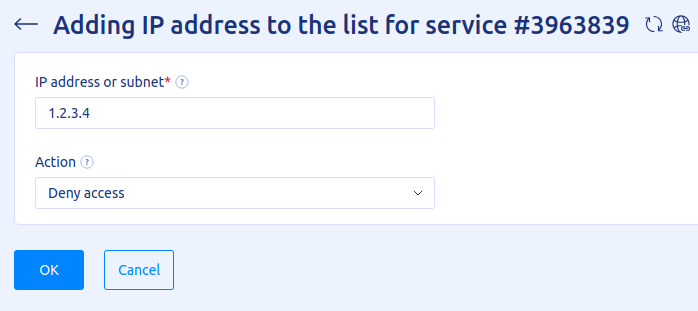
Add rule
- Click "Add".
- Enter
IP addressorSubnetto apply the rule. Allowed to use subnets from /32 to /24. - Select action,
Allow accessorDeny access. - Click "OK".
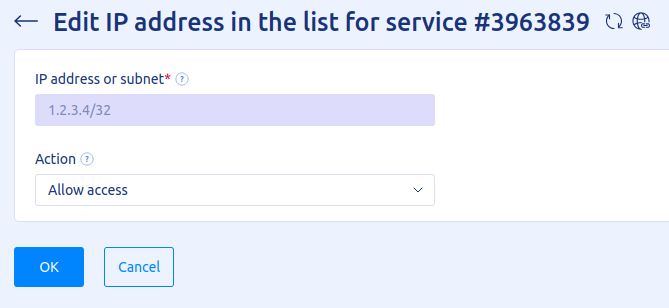
Edit rule
- Select current rule in the list
- Click "Edit".
- Select which action need to apply to specific IP address
Delete rule
- Select current rule in the list.
- Click "Delete", confirm action by clicking "OK".
20% OFF for new server order in any country!
A reliable server for your projects at an affordable price.
Other articles
10.04.2025
1 081
Knowledge base / Site protection
10.04.2025
1 240
Knowledge base / Site protection
10.04.2025
1 684
Knowledge base / Site protection