What is CDN?
CDN, or content delivery network — is a system of servers located in different parts of the world. They cache static elements of the site (images, scripts, styles, etc.) so that when a user accesses it, the data is downloaded not from the main server, but from the nearest CDN node. This increases response speed and improves resource performance.
CDN is enabled by default for all site protection services. Controls are available in the general settings, including enabling and disabling caching.
Content requirements
The following formats are cached:
.js, .css, .ejs, .png, .jpg, .jpeg, .gif, .ico, .bpm, .svg, .svgz, .cur, .pict, .tif, .tiff, .eps, .ttf, .eot, .otf, .woff, .woff2, .swf, .mp3, .mp4, .ogg, .wav, .webm, .webp, .avi, .flv, .mov, .pls, .midi, .mid, .mkv, .m4v, .ts, .m3u8, .txt, .exe, .zip, .xz, .gz, .lzma, .7z, .rar, .class, .jar, .tar, .doc, .docx, .xls, .xlsx, .ppt, .pptx, .pdf, .rtf, .csv, .ps, .odt, .ods, .odp, .odg.
Responses from the server are cached if
- The request does not contain a header
Authorization - The requested file has a format from the list above OR request contains a header
Acceptspecifying the type of static content (starts withimage,audio,video,text/css,text/font), OR request contains a headerIf-Modified-SinceилиIf-None-Match - The response contains the heading
Last-Modified,ExpiresилиCache-Control - The response contains the heading
Content-Lengthand its value does not exceed 2048 megabytes
The HTTP response header ddg-cache-status indicates whether content is being served from the CDN cache (status HIT)or from the target server (status MISS).
The Accept header must match the regular expression ^(image|audio|video|text\/css|font)
Cache Time and Revalidation
HTTP header directives are used to control caching Cache-Control .
The file storage time in the CDN cache depends on the freshness of file, which is set in one of the following ways:
- if there is a directive
s-maxage, the freshness period of the file is determined by its value; - otherwise the value is used
max-age.
If no direct directives are available, a freshness assessment heuristic is used:
- by the difference between
ExpiresandDate(if Date is greater than Expires, freshness is zero); - in absence of
Expires/Date— 10% of the difference betweenDateandLast-Modified; - in absence of
Date/Last-Modified— 5 minutes.
The freshness heuristic always ranges from 5 minutes to 10 days.
A file is revalidated if its lifetime has expired. The default lifetime is freshness, but some directives may affect its formula:
min-fresh— revalidate when min-fresh seconds remain before the object lifetime expires. Reduces the actual lifetime of the file.max-stale— gives from cache even within max-stale seconds after freshness expiration. Increases the actual lifetime of the file.
Clearing the cache
- Log in to the personal account, navigate to "Product/Services", click the "Site protection".
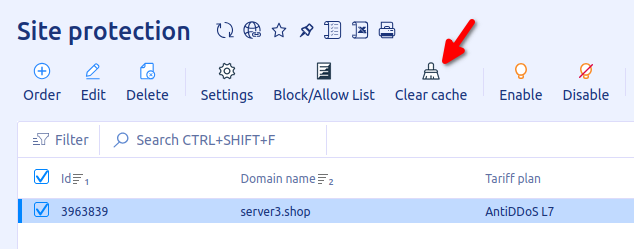
- Select site protection service, click "Clear cache" on toolbar. After clear cache site may load slowly, until cache updated.