




















































The iotop utility is a Linux command-line tool designed to monitor and display input/output (I/O) activity on your system. It allows you to monitor in real time the processes that are consuming the most disk activity.
Features of iotop
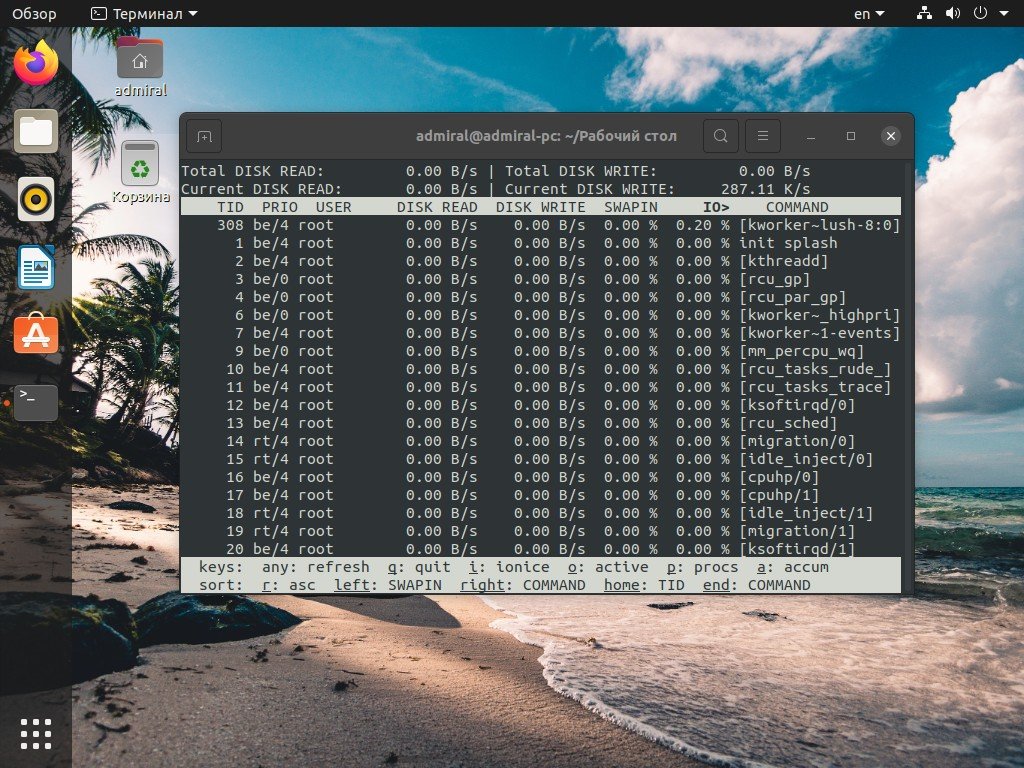
Some key features of iotop include:
- Displaying processes sorted by I/O usage.
- Displaying total I/O activity for each process.
- Support for filtering by process, user, or user group.
- Display of the current I/O rate for each process.
- Ability to stop, pause, or resume I/O monitoring for selected processes.
The iotop utility can be useful for identifying processes that significantly load the system with I/O, as well as for identifying any possible disk or I/O bottlenecks in the system. Use special commands to install iotop on different Linux distributions.
Debian/Ubuntu and its derivatives
sudo apt-get install iotopFedora
sudo dnf install iotopCentOS/RHEL
sudo yum install iotopAfter installation, you can run iotop from the command line using the command:
sudo iotopNote that superuser (root) privileges may be required to run iotop.
How do I uninstall the program?
To uninstall the installed Iotop package on Linux, you can use the apt-getor yum command depending on your distribution.
Debian/Ubuntu
- Open a terminal.
- Type the command
sudo apt-get remove iotopand press Enter. - Enter the administrator (root) password if required.
- Confirm the removal by entering
y, if required. - Wait for the removal process to complete.
CentOS/Fedora
- Open a terminal.
- Type the command
sudo yum remove iotopand press Enter. - Enter the administrator (root) password.
- Confirm the removal by entering
yif required. - Wait for the removal process to complete.
After performing these steps, the Iotop package should be completely removed from your system.