




















































05.12.2023
23:24
To change file access rights in Linux, use the command chmod (change mode). It allows you to change read, write, and execute permissions for the owner, group, and other users.
Command syntax
chmod [options] file permissionsOptions:
-R- recursively change permissions for all files and folders in a specified directory-v- output of information about each change of rights-c- display information only about files that have had their permissions changed
Rights:
r - reading
w - entry
x - fulfillment
Examples
The action can be one of two, either add - the "+" sign, or remove - the "-" sign. As for the access rights themselves, they are similar to the output of the ls utility.
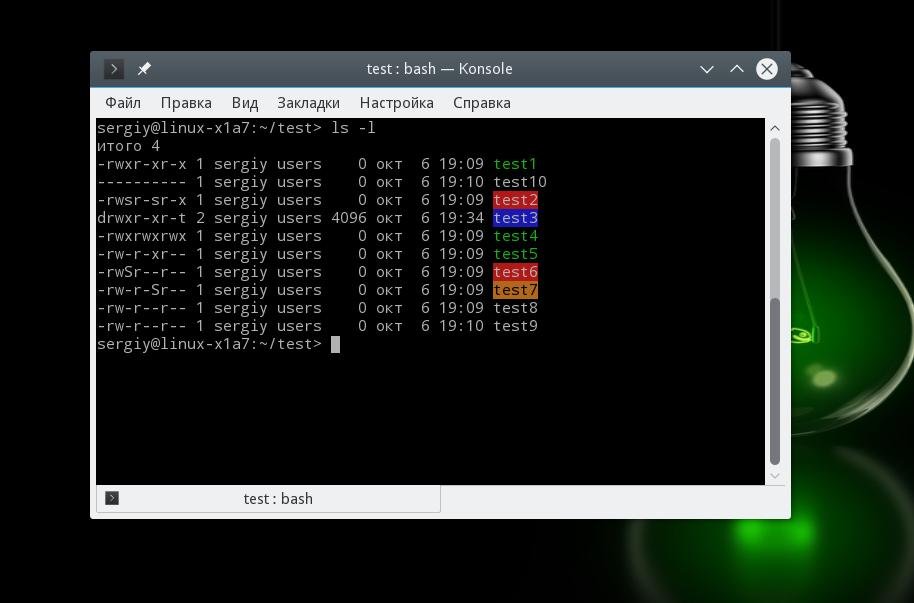
For example, all users have full access to the test5 file:
chmod ugo+rwx test0Or take away all rights from the group and the rest of the users:
chmod go-rwx test0Give the group the right to read and execute:
chmod g+rx test0The rest of the users are read-only:
chmod o+r test0Set SUID for file test6:
chmod u+s test1And for test7, it's SGID:
chmod g+s test2Let's see what we got:
ls -lAs you can see, it's simple.
20% OFF for new server order in any country!
A reliable server for your projects at an affordable price.
Other articles
05.12.2023
39 231
Knowledge base / Information
05.12.2023
7 651
Knowledge base / Commands
05.12.2023
17 490
Knowledge base / Programs